Attach the record to the message, your team opens it in one click

Your team talks inside Noyax. Attach an invoice, order or customer to a message; the recipient clicks the card and the record opens as it is now. A conversation started on the web carries on on the phone.

Messaging is included in every Noyax account. To use it on the phone you need the Noyax mobile app, sold separately.

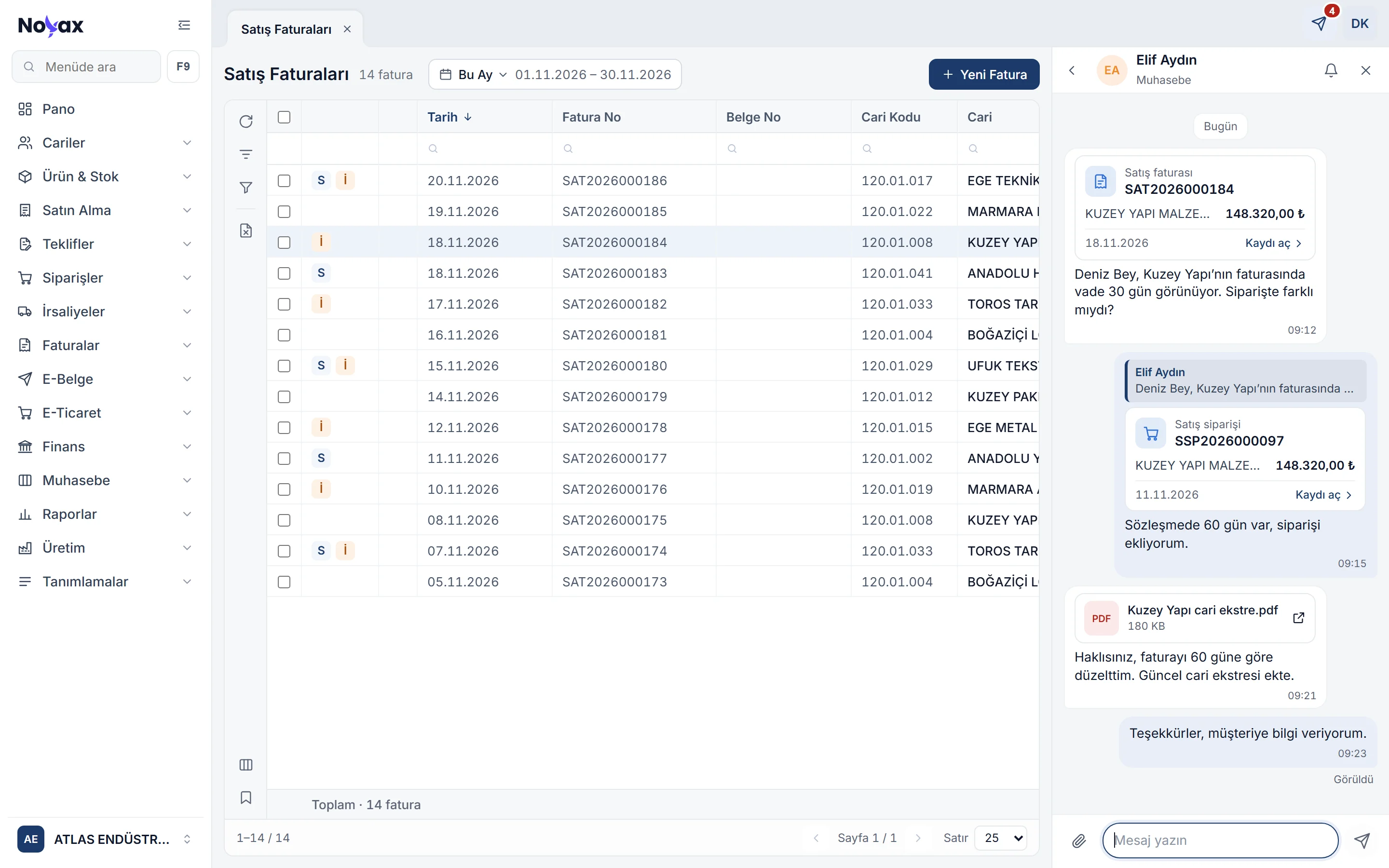
Noyax with the Messages panel open next to the sales invoice list: a conversation with Elif Aydın containing a sales invoice card, a sales order card, a customer statement PDF and Seen

The record sits in the message and opens in one click

In a general messaging app you take a screenshot or download a PDF to show an invoice, and the other person then looks up its number in your software. In Noyax the record’s card goes into the message, and whoever clicks it reaches the record itself. Click one of the cards below.

Elif Aydın Accounting
  1. Deniz, Kuzey Yapı’s invoice shows 30 days’ payment terms. Was the order different? 09:12
  2. Elif AydınDeniz, Kuzey Yapı’s invoice shows 30 days… The contract says 60 days, here is the order. 09:15
  3. Kuzey Yapı customer statement.pdf180 KB You’re right, I’ve corrected the invoice to 60 days. The updated customer statement is attached. 09:21
  4. Thanks, I’ll let the customer know. 09:23
    Seen
Sales invoice SAT2026000184 Opened for editing

KUZEY YAPI MALZEMELERİ A.Ş.

Invoice date
20/11/2026
Payment terms
30 days 60 days
Due date
20/12/2026 19/01/2027
Grand total
148,320.00 TRY

Elif corrected the payment terms after sending the message. The card carries the details as they were when it was sent; the record opens as it is today. Because you may edit it, the invoice opened for editing.
Sales order SSP2026000097 View only

KUZEY YAPI MALZEMELERİ A.Ş.

Order date
13/11/2026
Payment terms
60 days
Delivery date
20/11/2026
Grand total
148,320.00 TRY

If you may not edit the order, the record opens for viewing: you can see it but not change it.

Everyone in the conversation sees the card; opening the record needs permission to see it (permission to view the record’s screen and the record’s sharing code). A card can be a quote, order, delivery note, invoice, customer, product, bank, cash, customer or expense voucher, cheque or promissory note payroll, stock movement voucher, journal voucher or reconciliation.

Messages next to the screen you are working on

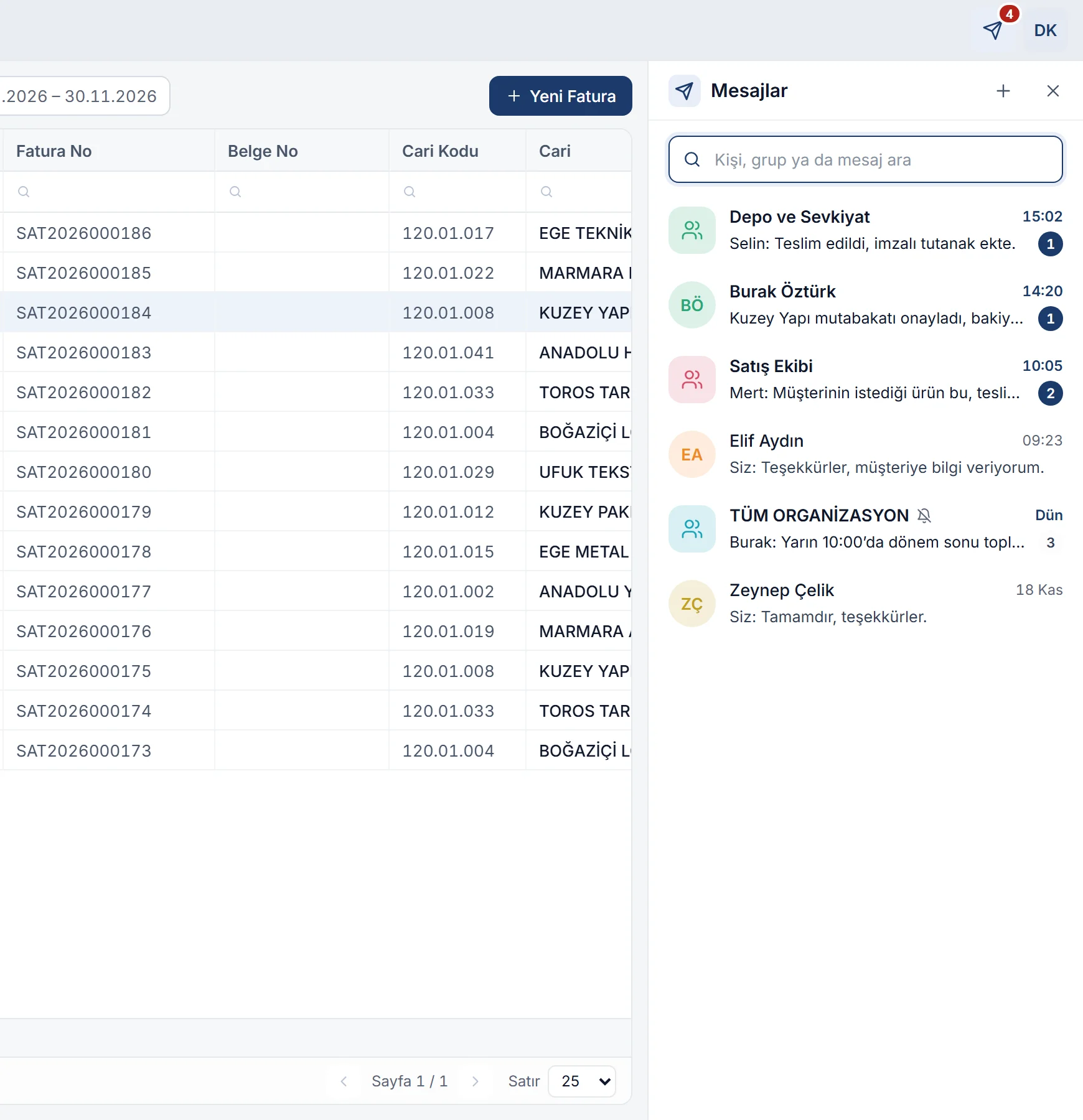
The paper plane icon in the top bar opens the Messages panel on the right; the screen narrows and you keep working on your invoice or list. If there are unread messages, their number appears on the icon.

  • Conversations are sorted by their latest message: the person’s or group’s name, the time and a short preview of the last message, and the unread count.
  • The search box searches people and group names and the text of messages.
  • While the panel is open, keys do not reach the card behind it; Esc closes the panel and F2 does not save the record.
Messages panel: conversations with Depo ve Sevkiyat, Burak Öztürk, Satış Ekibi, Elif Aydın, the muted whole-organization group and Zeynep Çelik, with unread counts Enlarge image

Share the invoice itself, not a screenshot of it

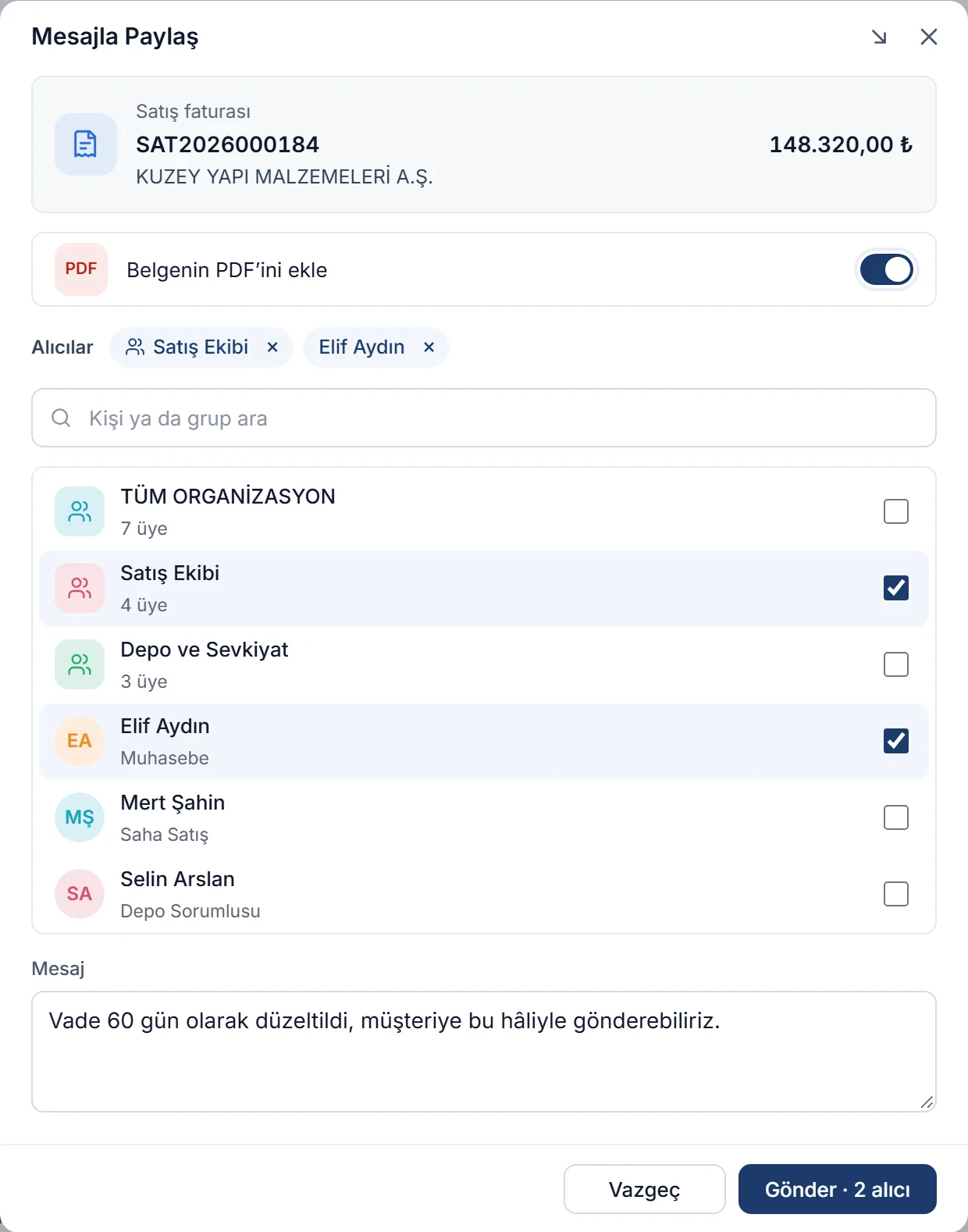
Right-click a row in a list and choose Share in a message. The window shows the record’s card, an option to attach the document’s PDF, the recipients and an optional message. Send writes the card into the conversation of every person and group you selected.

  • Available in the quote, order, delivery note and invoice lists; the customer and product lists; bank, cash, customer and expense vouchers; cheque and promissory note payrolls, stock movement vouchers, journal vouchers and reconciliations.
  • Attach the document’s PDF appears if you may print the document; the PDF uses the default design.
  • A record can be sent to up to 20 recipients; for more people, choose a group.
  • Send in a message in the report viewer sends the report on screen as a PDF, with the design and options you selected.
Share in a message window: the sales invoice card, Attach the document’s PDF switched on, recipients Satış Ekibi and Elif Aydın, a message typed and the Send button for 2 recipients Enlarge image

How it differs from general messaging apps

What changes when you move work conversations from chat groups on personal phones into Noyax?

The same work, in two places
General messaging app Noyax messages
Showing an invoice A screenshot or a downloaded PDF The record’s card; clicking it reaches the record
What the other person sees The image as it was when sent The record as it is now
Who can open it Everyone who receives the message Only people allowed to see the record
Who you message Anyone in your phone contacts Noyax users with access to your company
An employee who leaves a group Old messages stay on their phone Can no longer see the group’s history
Several companies All in one place, keeping them apart is up to you Each company’s conversations are separate

Message as a team with groups

Sales, warehouse, accounting: every group under Settings › Groups is also a group in messaging. In a group, the sender’s name and colour appear above their message, and clicking the group name in the header lists its members.

  • The whole-organization group contains every user in the company and is always in the list.
  • A user added to a group sees its entire history; a user removed from it no longer does.
  • Below your last message you see how many people have seen it: Seen · 3 people.
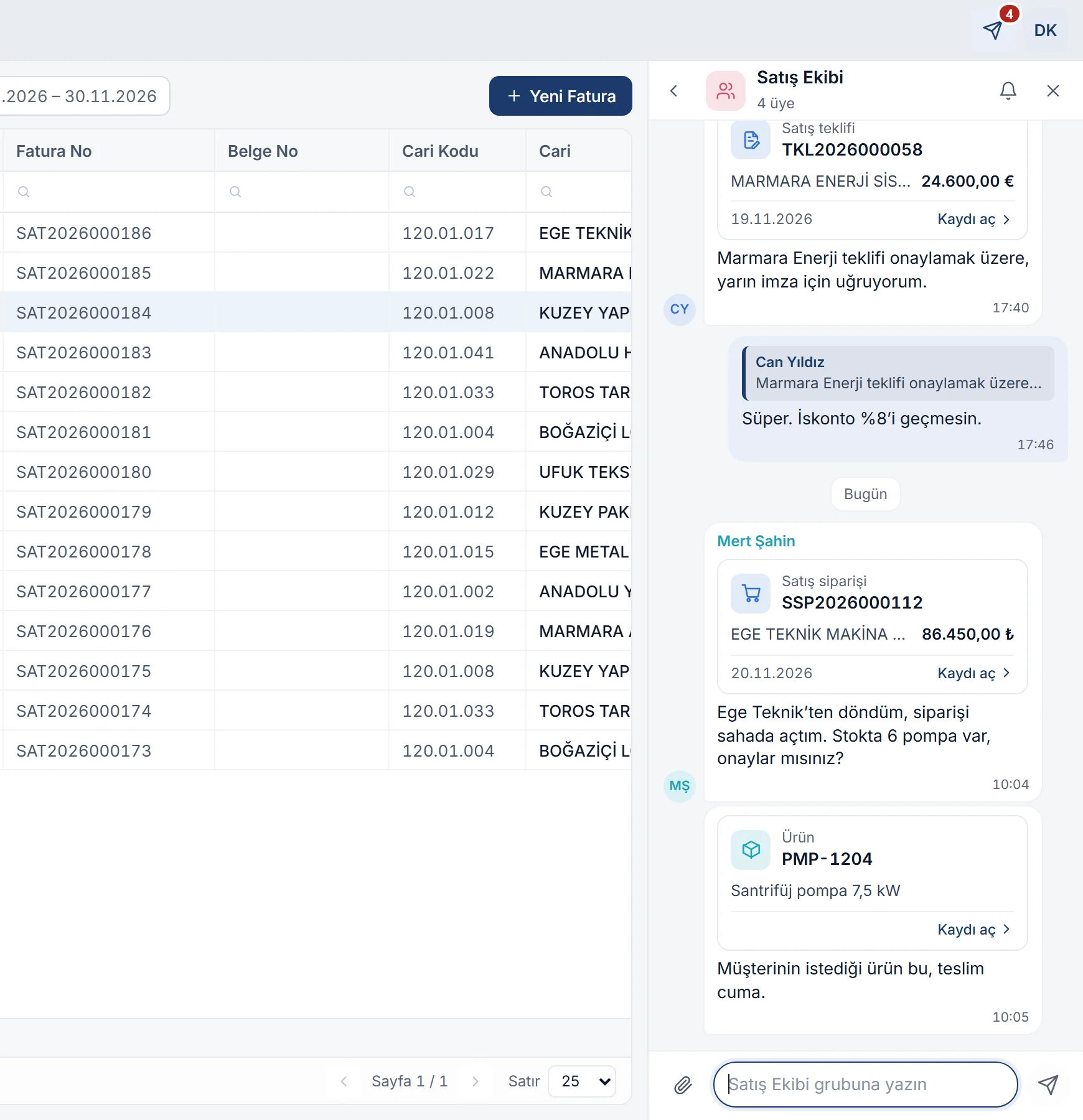
Satış Ekibi group: Can Yıldız’s sales quote card, a quoted reply, and the sales order and product cards Mert Şahin created in the field Enlarge image

Files, photos and screenshots

The paper clip button lets you choose files or photos from your computer; you can also drag files onto the conversation or paste a screenshot you copied into the message box.

  • Screenshot: the browser asks for permission to share the screen and takes a single image; you select the area with a frame and send it. The Messages panel does not appear in the image.
  • Photos are sent in a reduced size and shown as thumbnails; PDFs and images open in a new tab when clicked.
  • Up to 25 MB per file.
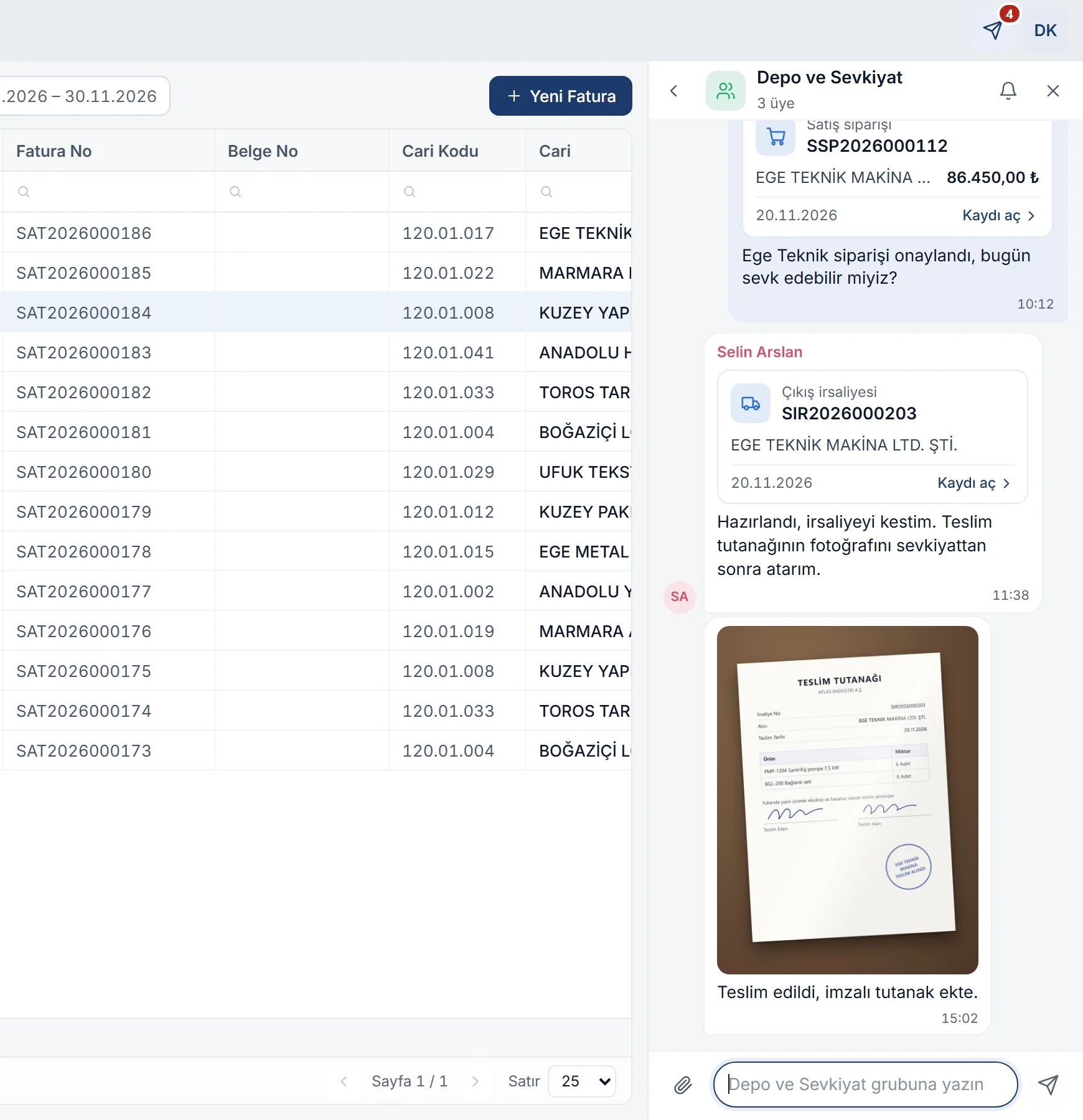
Depo ve Sevkiyat group: sales order and sales delivery note cards, followed by a photo of the signed delivery receipt sent by Selin Arslan Enlarge image

Choose who to write to

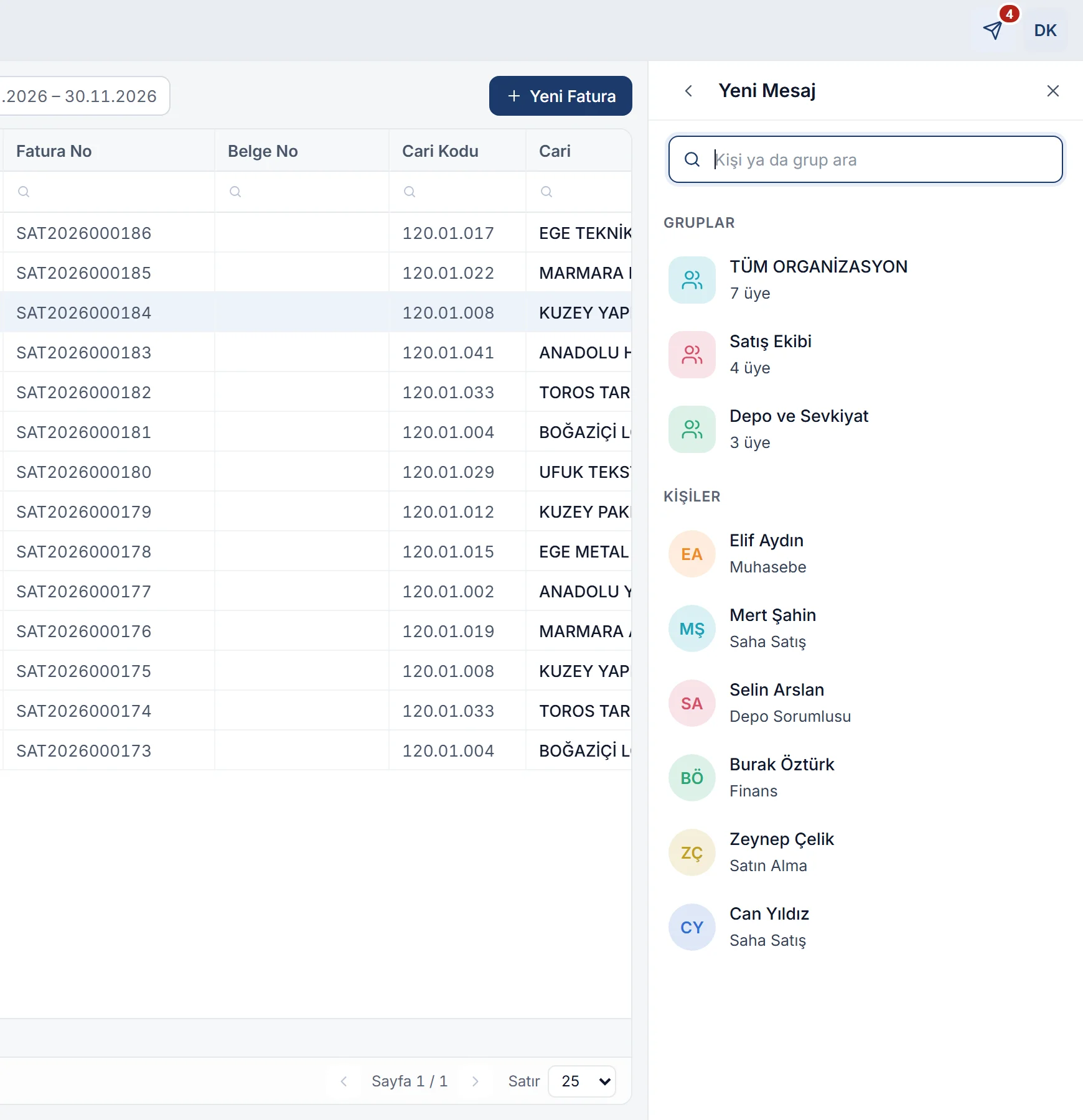
The + in the panel header opens the new message view: at the top, the groups you belong to and their member counts; below, the people with access to the company who can use messaging. If you have written to them before, the earlier messages appear too.

  • Reply, Copy, Edit and Delete are in the message’s menu; an edited message shows “edited”, a deleted one is replaced by “This message was deleted”.
  • The bell button mutes the conversation for you only: for 8 hours, 1 week or always.
  • Enter sends, Shift+Enter starts a new line.
New message view: groups (whole organization, Satış Ekibi, Depo ve Sevkiyat) and people with their roles Enlarge image

The field team writes from the phone, head office sees it at once

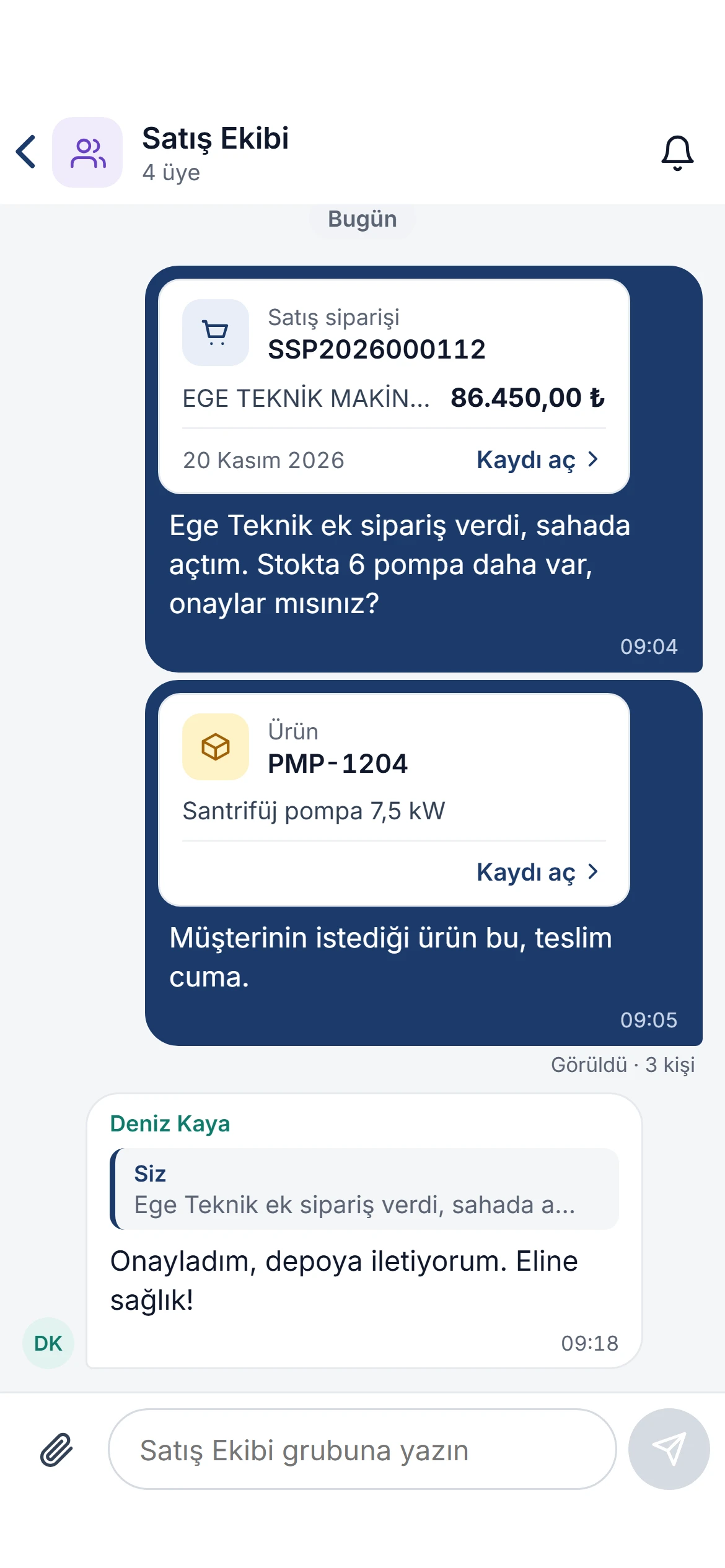
As your sales rep leaves the customer, they create the order on the phone and send its card to the sales group; the sales manager opens the record with one tap and approves it. The mobile app has the same conversations as the web: what is written on the phone appears on the web, and vice versa.

  • New messages arrive on the phone as notifications; muted conversations send none.
  • Record cards open on the phone too, and Share in a message works from the phone’s lists.
  • The Noyax mobile app is an add-on module sold separately.
Satış Ekibi group in the mobile app: a sales order and product card created in the field, Seen by 3 people and the sales manager’s approval

The delivery receipt, in the shipment’s conversation

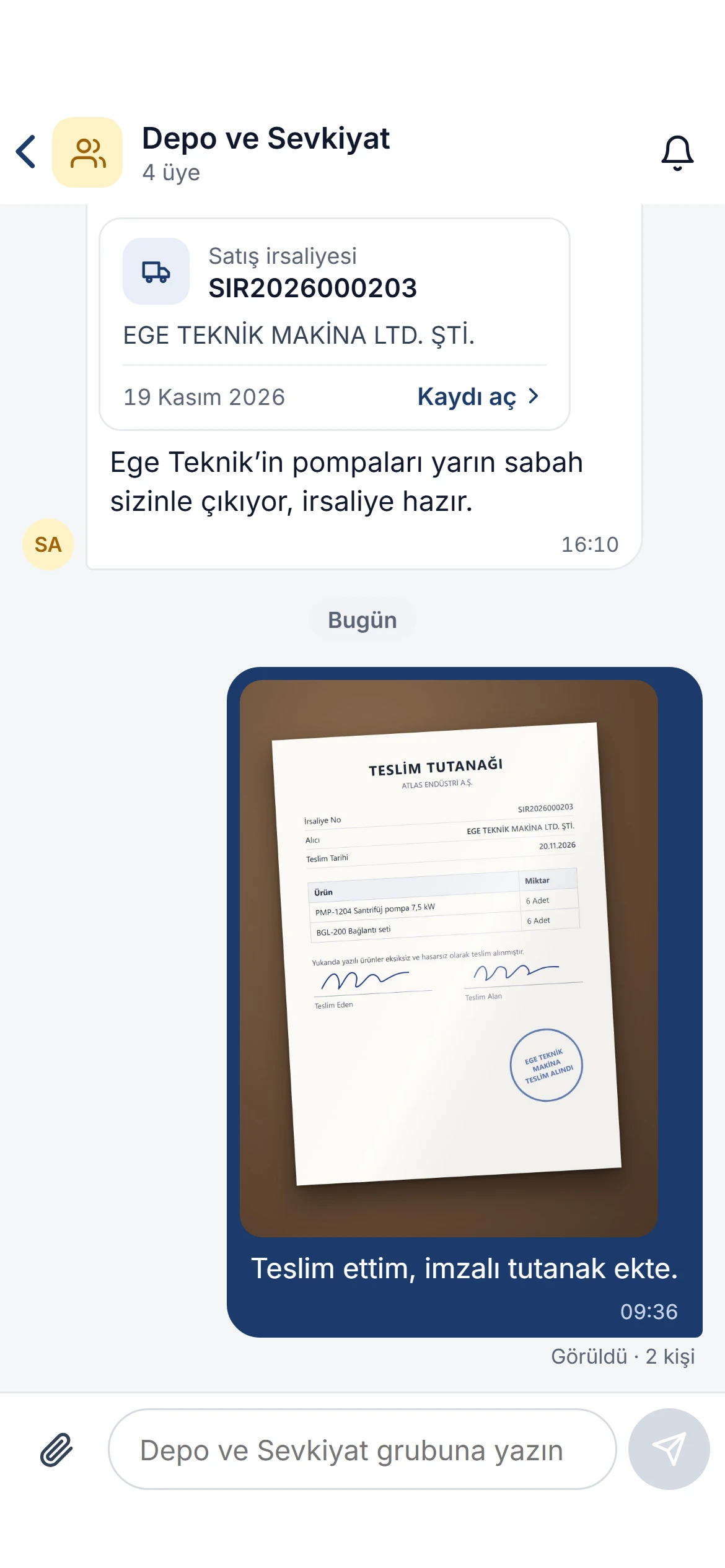
After the delivery you take a photo of the signed receipt and send it to the warehouse and shipping group, where the delivery note’s card already is. The paper does not get lost and head office does not have to wait.

  • The paper clip button offers Take a photo and Choose a photo or file.
  • How many people have seen it is shown below the message.
Depo ve Sevkiyat group in the mobile app: a sales delivery note card and the photo of the signed delivery receipt sent by the field rep, seen by 2 people

Conversations in your pocket

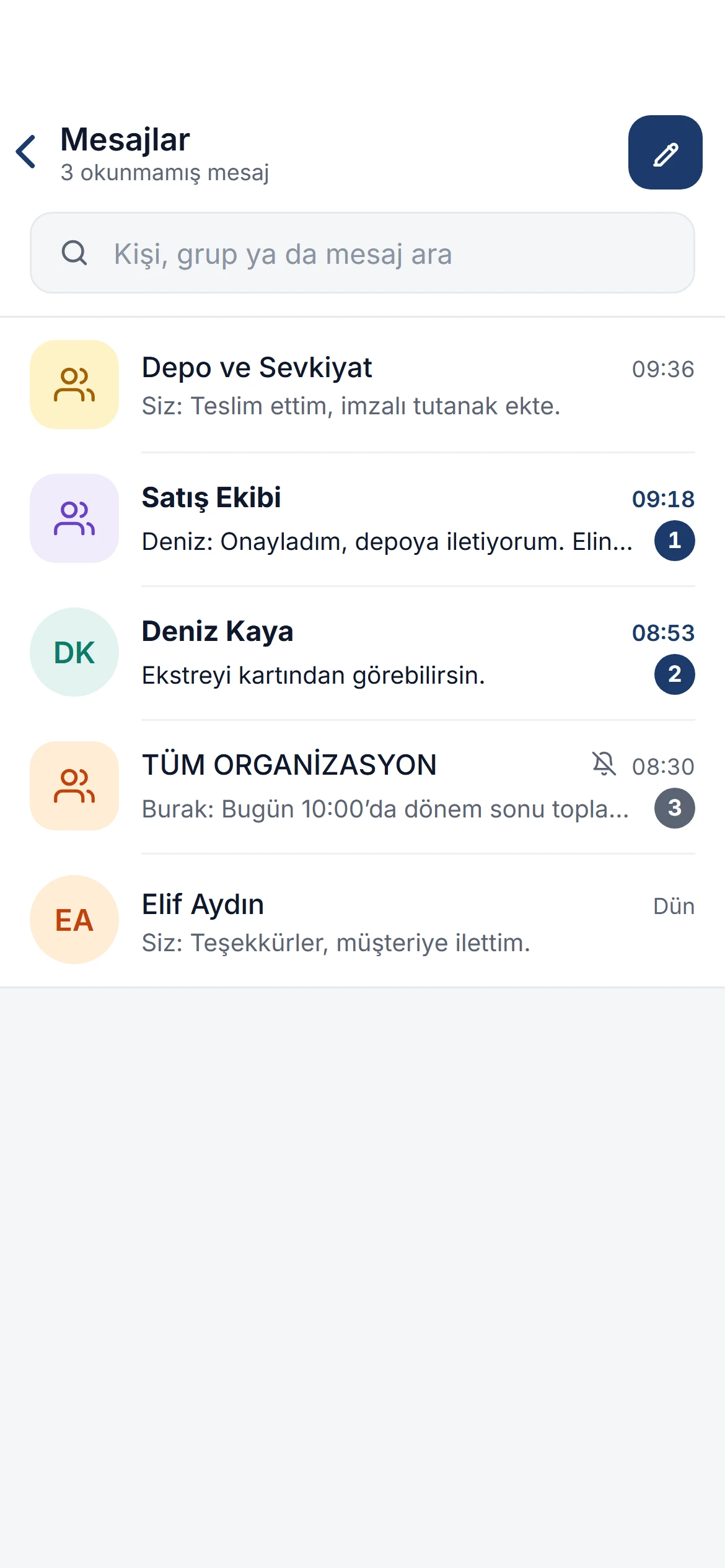
The Messages list on the phone counts unread messages and keeps groups and people in one list. Mute a conversation during a meeting and pick up where you left off afterwards.

Messages list in the mobile app: 3 unread messages; Depo ve Sevkiyat, Satış Ekibi, Deniz Kaya, the muted whole-organization group and Elif Aydın

Details that make a difference

The record card respects permissions
Everyone sees the card, but only people allowed to see the record can open it; those who may edit get it for editing, others for viewing.
Instant delivery
Messages arrive instantly through the notification service; if it cannot be reached, the open conversation refreshes itself at short intervals.
Replies and quotes
The message you reply to stays above yours as a quote; clicking the quote takes you to the original message.
Conversations per company
If you work with several companies, each company’s conversations are separate; switch companies and you see that company’s conversations.
Send a report in a message
Send a customer statement or a document from the report viewer as a PDF, with the design and date range you choose.
Paste and send
On Windows, paste a screenshot taken with Win+Shift+S into the message box with Ctrl+V; any text you typed becomes its caption.

Turn on messaging in a few steps.

Messaging is not a separate app: it works between your Noyax users, inside the company you have selected. You decide who can message through authorization schemes, and who writes to which group through groups.

  1. Grant the permission

    In the authorization scheme, Messages › View turns on messaging and Messages › Sends files and photos turns on attachments.

  2. Set up your groups

    The groups under Settings › Groups are groups in messaging too; the whole organization is always available.

  3. Take it to the phone

    With the Noyax mobile app the same conversations are on the phone, and new messages arrive as notifications.

Let your team start messaging in Noyax today.

Try it free for 14 days. No credit card needed.